FTIR – DDW, DI, D2O

Leave a comment

Today I ran FTIR spectroscopy on three ages of DDW, two ages of D2O and the four types of DI that Anthony is using in his current DDW5 experiments.

Many thanks to Stephen Myers for training me on the use of the FTIR, and Dr. Sanjay Krishna for providing me with access to the lab and machine. Stephen was in the lab today and was graciously helpful, as always.

As always I started with a scan of the empty cuvette for the background. Today I kept getting a really strange scan image. Stephen took a look and said confirmed that the scan didn’t look quite right. He changed the Bench Set Gain option to autogain, Anthony cleaned the cuvette, and the next scan came out as we expected it should. After we got a correct background we did a comparison of the previous FTIR background (2/2/2012), today’s background with no autogain correction, and the corrected autogain background. We used today’s autogain corrected background scan for all of our scans today.
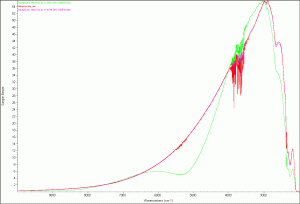
background-old-bad-good

Comparison background scans

For each of the following scans we used the same set up as my previous scans from 2/2/2012, using a quartz cuvette and 3µL of the specified water sample.

My first set of scans were three samples of DDW, each opened on a different date (9/6/2011, 1/17/2012, and 2/16/2012). I expected to see a difference because of possible atmospheric absorption of D2O. What I found was they were all pretty much the same the first scan that I ran. Unfortunately, I messed up the save process and had to re-scan the September and January samples. That scan produced a different result for January as shown in the following figure.
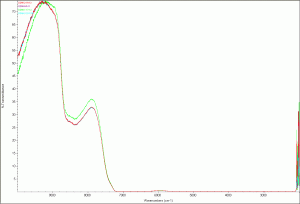
DDW second scan

DDW second scan

DDW (second scan) zoomed image

Next I scanned the four types of DI water Anthony is currently using in his current DDW5 experiment (see link). The four types of DI water are:

  1. DI from the Easypure RoDI (Thermohe) machine in our lab (Ro_DI – purple)
  2. CHTM’s DI (CHTM_DI – Red)
  3. Sigma molecular biology grade water (SMol_DI – light blue)
  4. Sigma double purified water (SDP_DI – green)

The results are surprising. The Sigma double purified water’s scan was slightly different than the other three, which were almost identical. This is certainly something to take a look at.
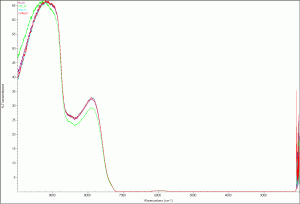
Deionized water scan
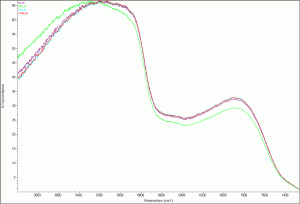
Deionized water - zoomed image

Next I scanned two samples of D2O:

  • a bottle opened on 2/16/2012 (red in the scan image)
  • a bottle opened on 11/1/2011 (blue in the scan image)

This scan also produced differing results, possibly from atmospheric absorption (what we had expected to see with the different aged DDW).

D2O scan

D2O scan zoomed

Finally just for comparison, I opened a new window and opened the scan of the February DDW and D2O, the Sigma double processed, and the Sigma molecular biology grade water just to see how the results compared. Interesting that the DDW and Sigma double purified water are identical. Hmmm…

Comparison of DDW, D2O and both of the Sigma DI scans

I’ve uploaded all the raw data onto FigShare with all the images.

My next project is to read up on water frequency and figure out what all the numbers mean. I’ve found a few papers and a website that will probably help shed some light on my very pretty graphs. I’ve ordered two of the papers from the library and the other information is available online.

Open Notebook Science — Taking what I’m Learning Outside

6 Comments

Some Background: I”ve got a full++ course load this semester, so I haven’t been in the Lab much this week to work on research related stuff. I’m a Computer Engineering major, hoping to get accepted into UNM’s 3+2 program and end up with a BS in Computer Engineering and an MBA in May 2015. My main motivation for working with Dr. Koch and Anthony was the Open Notebook Science portion of their work (and I just love the atmosphere of our lab — we’re the cool kids in our building).

So while I find all the stuff we do with D2O and protein studies really fascinating,my first love is with ONS. I truly believe that this is the way of future science and I’m so very grateful to get to be a part of it.

When I’m busy with all the engineering studies, in the back of my mind is a constant buzz … How can I take what I’m learning in school, the goals that I have, and marry all that with this exciting ONS movement — that I really want to continue to be a part of, even after my REU is over? :End Background

Here it comes… wait for it… wait for it… wait for it:

I had a really interesting experience today and I think that the marriage I want is going to arise.

In between classes this morning I ran into my Logic Design Prof (Marios Pattichis), and we started talking about the Lab portion of the class. He asked me what I thought, and I told him (truthfully) that VHDL is cool, but the supporting documentation for the lab really sucks. We then got into this discussion about my past experience (15 years as a technical writer, documentation manager, and trainer) and how I could maybe contribute to make the lab better.

I have been thinking about talking to him about this very thing, but was afraid that as an undergrad I wouldn’t qualify, I would be turned down, or whatever else the fear wanted to tell me for that day.

I said I would love to start a dialog with him about this over the rest of the semester. He then says, “Do everything (i.e., my lab work) open source.” I’m hoping that what I heard was what he really meant. Anyway, then I start to get really excited, and tell him about what I’m doing in the KochLab with Open Notebook Science.

 ”OMG, this is really exciting,” I’m thinking. This is just the opportunity that I’ve been looking for. So that is my story.

I’m going to set up another blog for my Logic Lab Notebook in the next week (in my spare time LOL). Dr. Pattichis seemed to like that idea, and mentioned something about making it available to the class. So I need to get on it soon. I’m also hoping to start reworking the lab tutorials so that maybe I can be a TA or something next fall.

I’ll have to get really dedicated about blogging every day.  That is my weakness. My strength is my excitement about ONS.

E.coli – the morning after

3 Comments

Anthony checked the e.coli last night before he went home (after I went to class) and there wasn’t anything going on. He decided to leave the e.coli in the incubator shaker overnight at 150 RPM. This morning when I got into the lab, we checked the test tubes.

The P. Blue is cloudy which would indicate growth, yay!

P Blue e.coli... cloudy indicates that there was growth

The pALS is clear; probably no growth.

pALS e.coli - clear; probably no growth

Thermo Scientific Nanodrop 2000c SpectrophotometerTo accurately measure the number of cells we used a Thermo Scientific NanoDrop 2000c Spectrophotometer.  I’m new to spectroscopy, so for those of you who are also new:

“A spectrophotometer is a photometer (a device for measuring light intensity) that can measure intensity as a function of the light source wavelength. Important features of spectrophotometers are spectral bandwidth and linear range of absorption or reflectance measurement.” ~ Wikipedia – Spectrophotometry

Our method:

  1. Connect the nanodrop spectrophotometer to Anthony’s laptop and start the Nanodrop 2000 application.
  2. L to R: Growth Medium Only, GM & pALS, GM & P BluePrepare the three (3) sample cuvettes, with 1000 mL of LB Broth Growth medium.  The first cuvette has only the growth medium. This will serve as our blank reading (similar to the background reading we take for the Ft-IR).
  3. In the second cuvette we added 1000 mL of pALS to the growth medium.
  4. The third cuvette had an additional 1000 mL of P-Blue.

Now on to the scans:

  1. Click Cell Culture from the main screen of the nanodrop application.
  2. Starting with the “Blank” cuvette (the one with growth medium only), insert the cuvette into the cuvette holder of the nanodrop spectrometer.
    • Check (if not already) Add to Report and Use Cuvette. We used a 10 mm Path Length and no Stir Speed.
    • Click the Blank button (at top of screen).
    • Click the Measure button.
  3. Open the lid, remove the blank cuvette and insert the 2nd cuvette, pALS. Close the lid.
    • Enter a name (upper right of screen) for the new cuvette. We entered pALS.
    • Click the Measure button.
  4. Open the lid, remove the pALS cuvette and insert the 3rd cuvette, P Blue. Close the lid.
    • Enter a name for the new cuvette. We entered P_Blue.
    • Click the Measure button.
  5. Remove the last cuvette and dispose of all the cuvettes properly.

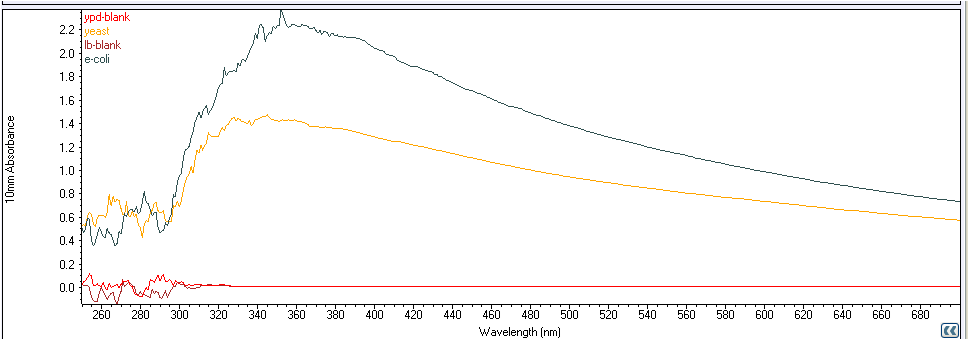
The nanodrop spectrometer software displayed a graph as we measured each sample. The A600 number for each sample was 0.001, -0.01, and 0.714 respectively.

Creation of E.Coli

4 Comments

Today we are making e.coli for our DDW experiments. The first step is to make the e.coli medium. We made up a small batch of LB Broth, using the instructions from the Sigma-Aldrich website.  We only made 100mL of LB Broth, instead of 1L, as follows:

  1. Mixed 2 g of LB Broth powder with 100mL of distilled water.
  2. Autoclave for 15 minutes at 121°C.

After the mixture cooled, we measured 10mL into two test tubes and mixed in a minute amount of e.coli.

Next we placed the test tubes in the New Brunswick Scientific Innova 4300 Incubator Shaker at 37° C. Our shaker’s thermostat is about .3°C – .4°C high , so we stuck a thermometer probe in the shaker to get an accurate temperature measurement.

We set the incubator shaker at 70 RPM for a few hours. I have to leave for class, and Anthony wasn’t sure if we needed to leave it longer or maybe even overnight. Please check his blog for the final details.

ToDo List – as of 2/7/2012

Leave a comment

While having lunch with Anthony I realized that I’ve been keeping my To Do list in my head. That’s a fairly dangerous place because of the high volume of traffic zipping around in there right now.

I’ve started a Google Docs Spreadsheet to help me keep better track of the stuff I have going on.

I’m using this list as a daily, “What do I want to accomplish today” type of list. Hopefully it will help me to better utilize my time in the lab (there is so much to learn about, I get distracted easily).

For instance, today, I was going through my email, logged into Google + and saw a post by Cameron Neylon about Zooniverse, Citizen Science and FigShare. I’m thinking that’s some cool stuff, let me take a quick peek. My “quick peek” turns into me creating a Zooniverse account and then proceeding to classify at least three stars and post a question – all to the tune of 20 minutes gone.

Nothing wrong with all of that, except I have a few other things to look over before I start worrying about which stars have planets. Although, it is super cool, and I want my sons to look for planets instead of playing MineCraft.

E.coli meets DDW – step 1: Autoclave

1 Comment

We are preparing for our upcoming experiments testing the growth rate of e.coli in different water types. When working with e.coli all the equipment must be sterile. Here at KochLab we use a Tuttnauer 3545M autoclave to sterilize our equipment and mediums.

Autoclaves use high pressure steam to sterilize equipment, read more at Wikipedia. Here is our process for solid items (liquid items follow the same procedure with some setting changes as noted in parentheses):

  1. Add water to the autoclave reservoir through the opening on the top of the machine.
  2. Take out the tray and put all the items to sterilize on the tray. Place a foil seal over the top of any open container. Place a piece of autoclave tape on each item. When the white lines on the tape turn black, the item is autoclaved properly.
  3. Turn on the autoclave and turn the bottom dial to Fill Water. When the water has filled to the front lip, turn the Fill Water dial off.
  4. Place the tray of items in the autoclave, close and lock the door. Tighten the lid… REALLY TIGHT! The autoclave is cooking things under heat and pressure.
  5. Set the temperature to 273° F (250°F) and the timer to 45 min (60 min). The orange Heat light should be on.
  6. After the timer sounds, wait about half an hour. Check the autoclave and make sure the white pressure arrow is at zero.
  7. If the white pressure arrow is at zero, set the dial to 0 (zero, turn counter-clockwise) and loosen the door so that it is open about 1 inch.
  8. Set the dial to Dry and the timer to 30 min. The orange Dry light should be on.
  9. After the timer sounds, turn the knob to 0, open the door, and, using heat resistent mits, remove the sterilized items.

FTIR scan data from 2-2-2012 uploaded to FigShare

3 Comments

I’ve uploaded a JPG image of all the scans from yesterday to figshare. The raw data is also available for anyone interested. I’m wondering if this makes me half as cool as Anthony.

Let the Ft-IR scans begin

1 Comment

I was only in the lab for a few hours today. Enough time for Anthony and I to start our first round of water scans. Today was a repeat of the December scans of DDW, DI, and D2O. It was my first go at running the Ft-IR on my own.

Stephen Myers has given generously of his time to train me and help me with my first “solo flight.” Everything went really smoothly, and Dr. Sanjay Krishna has generously given us access to

I was able to follow my instructions from my training using my earlier post. Everything worked great. We obtained data that I will analyze next week when I’m back in the lab. The data looked like it matched Anthony’s original scans.

Next up will be weekly scans of DDW to determine how quickly it absorbs deuterium from the surrounding atmosphere.

Ft-IR scans

Leave a comment

I sent an email to Stephen last night requesting some (supervised) time on the Ft-IR. He responded right away and I have an appointment tomorrow around 2 to run the first of our scans.

For this run I’m going to repeat Anthony’s scans from December. I’m hoping that Stephen and I can get a few more sessions in next week so that I can get unsupervised use of the Ft-IR.

Anthony and I met this morning. There are a few things we are hoping to learn more about:

  • the absorption rate of D2O in DDW
  • what do varying amounts of D2O look like

I’ve started a table to track my work on these and any other questions that may pop up.

Project Update

Leave a comment

Some Background:  My long term goal is to complete a BS CompE and an MBA under the UNM 3+2 program, expected May 2015. I’ve got a ton of work experience in project management; I’m really good at it, and I love it.  I came back to school so I could eventually get into management.

Anthony and I have been talking quite a bit about the best fit for me here in the BioPhysics Lab. I really enjoy learning about everything, and it is all really interesting, and Anthony and I all work well together. One morning we were talking about all the projects we have going on and Anthony asked if I wanted to be the project manager for them. What a great fit for my goals and experience. We decided that I would work as a Research Assistant, focusing on the project management side of our work.

So, the semester is started, and I’ve finally gotten a regular lab schedule worked out. Anthony and I met today about all of our ongoing projects. The synopsis of current and upcoming happenings in our lab is posted on Google Docs.

P.S. I’ve had to shelve my R learning project for now. I’ve gotten a fair understanding of the language… enough to basically understand code already written and edit it if needed. I’ve also gotten the hang of the syntax. Had to put it down for a bit though, this semester I’ve got 4 classes with 4 languages to learn. I didn’t want to push my brain over the edge.

Older Entries

Follow

Get every new post delivered to your Inbox.